May 7, 2026 · Anton Grishko
Cmux is what tmux would be if it were designed for AI agents
tmux is one of the great pieces of software. For running multiple AI agents in parallel on a laptop, Cmux is what we moved to, and why.
TL;DR — tmux is one of the great pieces of software for server-side multiplexing. For running a fleet of AI agents (Claude Code, OpenCode) on a Mac, Cmux is the right shape — visible per-tab state, notification rings, embedded browser, git-worktree-friendly. We still run tmux on bastions.
The setup we've been running
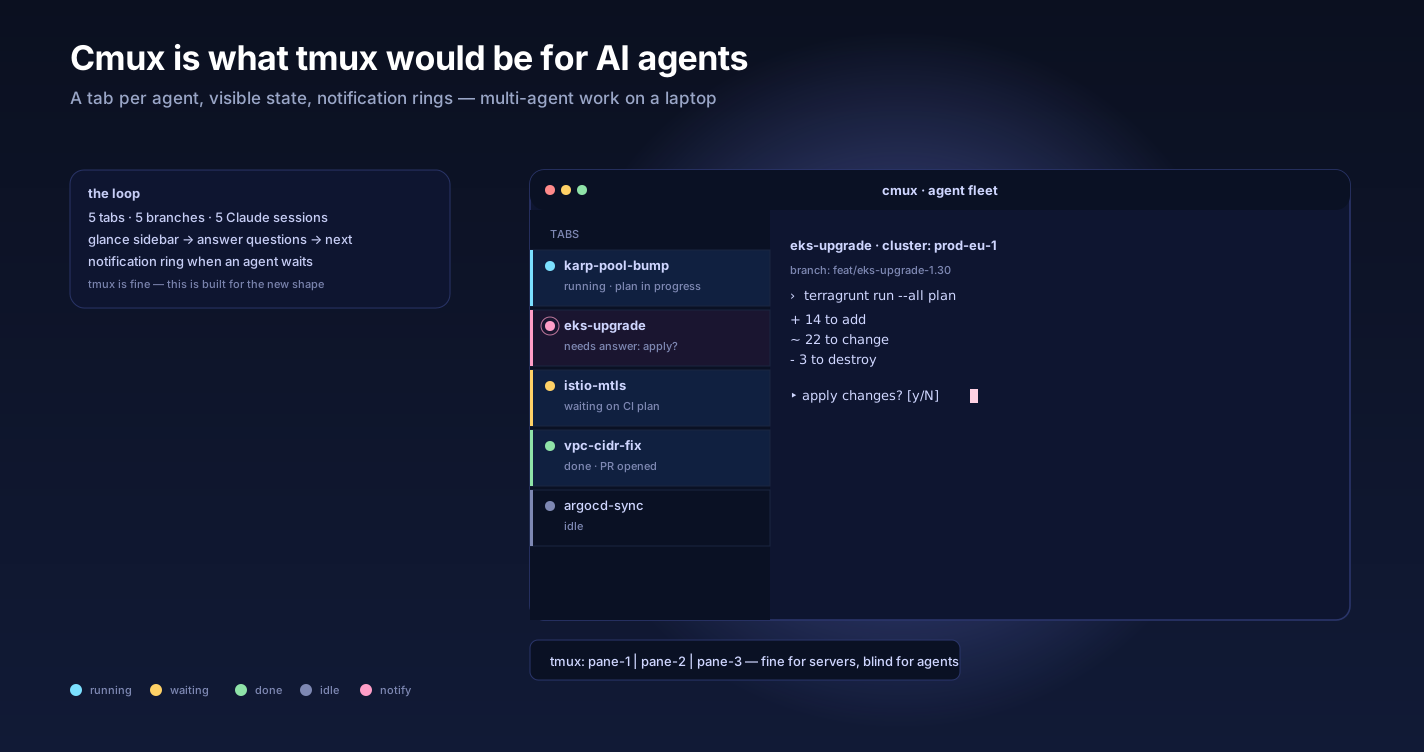
Open Cmux. Five tabs in the left sidebar, each on a different git branch of the customer's IaC repo. Each tab is a Claude Code session working a different sub-task. The sidebar shows me, per tab: the branch name, the working directory, any forwarded ports, and a notification ring when the agent needs my attention.
I glance at the sidebar. Two tabs are running, one is asking a question, one is done, one is idle. I click the asking-question one, answer, click the next.
That's the loop. It's how I — and most of our team — run multi-agent work today. The full fan-out pattern that uses this is in When one agent isn't enough.
It is not a tmux loop. tmux is what we used to do.
What tmux gets right
Let me say this clearly because the rest of this post is about why we moved off it: tmux is one of the great pieces of software. It is everywhere, it is rock solid, it survives ssh disconnects, it scripts cleanly, and the configurability is unbounded. If you sit on a server and need terminal multiplexing, tmux is the right tool. We still run it on every bastion.
For the specific problem of running multiple AI agents at once on a laptop, though, tmux has design choices that don't fit.
Why tmux fights you for agent work
Three concrete frictions:
1. Notifications are non-existent. When an agent finishes a task or needs input, tmux doesn't tell you. The pane just sits there. You have to switch into the pane to know. With four agents running, you cycle through panes manually. The CPU isn't the bottleneck — your attention is.
2. The session model is server-shaped, not workspace-shaped. tmux thinks in sessions / windows / panes. An agent fleet thinks in tasks / branches / artifacts. The two don't map cleanly. You end up with a custom naming scheme and a wiki page explaining it.
3. No browser, no graphical artifacts. When the agent generates a Grafana deeplink, a Terraform plan, an ArgoCD sync screenshot, or a generated diagram, you copy-paste the URL into a browser. Constantly. tmux is not the right surface for an agent that mixes CLI work with UI artifacts.
You can paper over each one with config and tooling. We did, for a long time. None of it was great.
What Cmux does differently
Cmux is a native macOS terminal app from manaflow-ai, built on top of libghostty for rendering. Free and open source. The design center is "running multiple agents in parallel" — not as a feature, as the entire premise.
Three things it does that tmux doesn't:
Vertical tab sidebar with workspace state. Each tab shows: git branch, working directory, forwarded ports, notification ring. You see the whole fleet at a glance. No keyboard incantations to discover state.
A notification ring per tab. When an agent prints a string that matches a configurable pattern, the tab rings. You see it in the sidebar even when you're focused on another tab. This single feature changes how multi-agent work feels.
An embedded browser in a split pane. When the agent generates a URL, you can open it in the same window. Plan output, Grafana panels, ArgoCD app pages, GitHub PRs, all live next to the terminal. We use this constantly when the agent is generating artifacts that need eyeballs.
There's also a socket API — Cmux exposes its workspace state to scripts. We use it lightly, mostly for "list active agents and their statuses" automation that feeds our internal dashboard.
What it doesn't do
Honest list:
- macOS only. No Linux build, no Windows. If you live on Linux, it's not for you. tmux still wins, or Zellij if you want a more modern multiplexer.
- No remote-server story. Cmux runs on your laptop. For a long-lived process on a bastion, you still want tmux on the bastion.
- Session restore is partial. It restores window layout, working directories, browser URLs, scrollback. It does not restore active processes. If your machine restarts, the agents are gone — you re-launch them. tmux's "I survived a 6-hour ssh dropout" trick doesn't apply here.
- It's young. Expect rough edges. We've hit a couple of crashes; both reproduced and were fixed in the next release.
How we actually use it
A typical fan-out session, on a customer repo:
Tab 1   main          /repo               ports:8080      ← orchestrator
Tab 2   feat/cnpg-1   /repo-wt-1          ports:13370     ← worker, port-forwarded Strapi
Tab 3   feat/cnpg-2   /repo-wt-2          —               ← worker
Tab 4   feat/cnpg-3   /repo-wt-3          —               ← worker
Tab 5   shell         ~/                  —               ← scratch tab for kubectl, ad-hoc
Each wt-N is a git worktree. Each worker is a Claude Code instance. The orchestrator is the planner from our agent-fleet pattern — see When one agent isn't enough. When a worker rings, I tab over, glance, answer or approve, tab back. The browser pane on the orchestrator tab is open on the customer's PR list.
Doing this in tmux would work — we did it for months — but it required custom hooks, a shell prompt that echoes status to the title bar, and constant mental tracking. Cmux makes the state visible without the configuration.
Other tools we evaluated
- Zellij — modern multiplexer, much better defaults than tmux, plugin system in WASM. We use it on Linux. Same agent-notifications gap as tmux, just easier to configure.
- Warp — closed-source AI-native terminal. Has its own agent surface; if you want Warp's agent, it's good. We don't, because we want our own agents (Claude Code, OpenCode) and Warp's surface gets in the way.
- Wave Terminal — open source, similar design center to Warp. Worth watching. The graphical artifacts story is good; the multi-agent story isn't there yet.
- Ghostty — the rendering engine Cmux uses, also a standalone terminal. Single-window-per-window model. Great terminal, not a multiplexer.
- OpenCode and Claude Code's built-in session management — both have multi-session features built in. Useful inside one process; doesn't help when you want six processes side-by-side.
The take
If you run multiple agents at once on a Mac: try Cmux. It is the first terminal that treats "I have N agents going" as the default, not the exception. It will not replace tmux on your servers — that's a different problem — but for the laptop-side of an agent fleet, it's the right shape. For the host comparison, see OpenCode vs Claude Code vs Cursor.
If you're on Linux: stay on tmux or move to Zellij and build your own notification glue. The pattern (visible per-tab state, notification rings, embedded browser) is what matters; the specific tool is replaceable.
We've been running on Cmux for a while now. Per-engineer fleet size went from "two agents max, anything more is unmanageable" to "five is comfortable, eight if I'm focused." That's a real productivity number. It's why this post exists.
Further reading
- Cmux on GitHub — source, releases, issues.
- tmux project — the multiplexer we still use on servers.
- Zellij — the modern Linux alternative.
- Ghostty — the renderer Cmux uses.
- Git worktree docs — what enables per-tab branches.
- When one agent isn't enough — fanning out work across an agent fleet — the fan-out pattern.
- OpenCode vs Claude Code vs Cursor — which agent in each tab.
Want help wiring an agent-fleet workflow into your team? Talk to us.