April 22, 2026 · Anton Grishko
Karpenter is the most underrated EKS upgrade in years
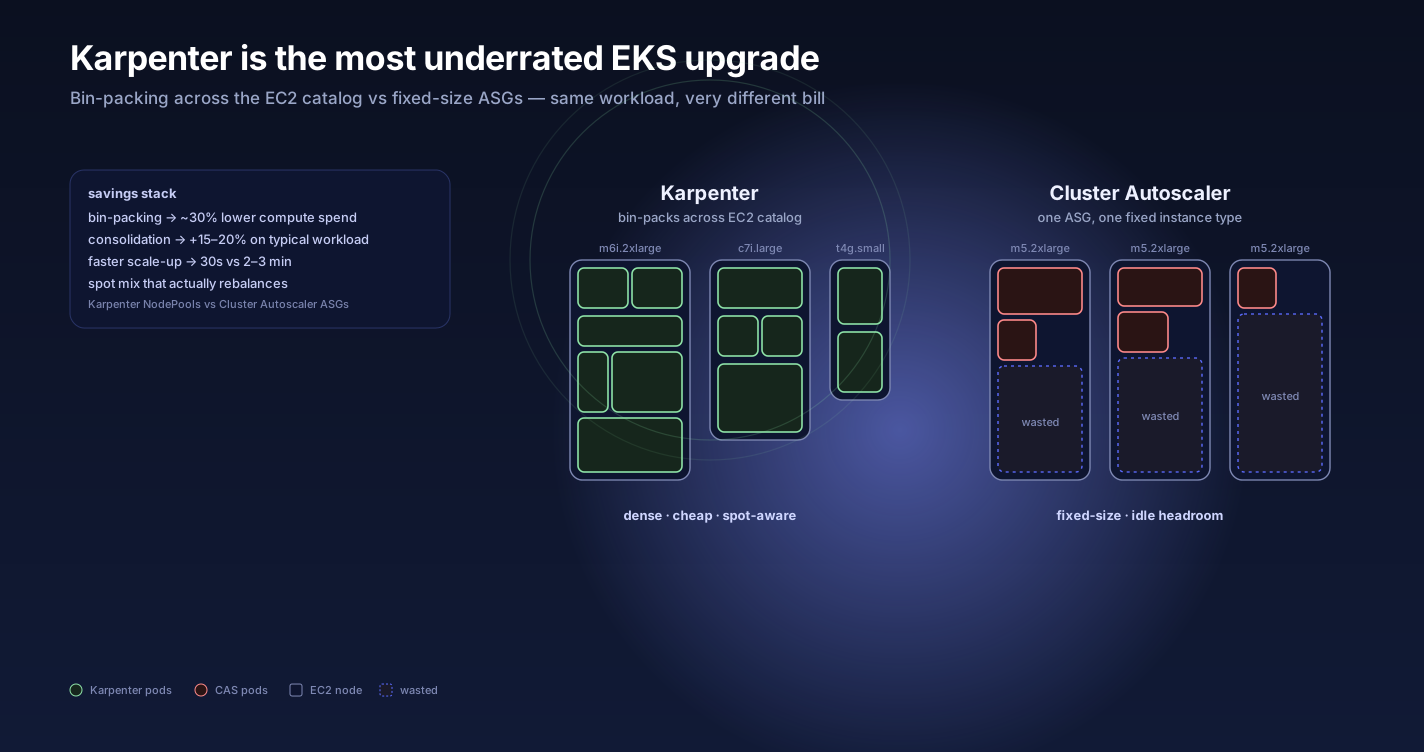
If you're still running Cluster Autoscaler on EKS in 2026, you're paying 30–40% more for compute and getting slower scale-up. Here's the case for Karpenter.
TL;DR — If you still run Cluster Autoscaler on EKS, Karpenter is the highest-ROI swap you can make this quarter. Better bin-packing, 30-second scale-up via the EC2 Fleet API, real spot consolidation, and per-workload NodePools — 30–40% off your compute bill, out of the box.
The four things Karpenter does better
Bin-packing without ASGs. Cluster Autoscaler talks to Auto Scaling Groups, which means you pre-decide the instance type per group. Karpenter looks at the pending pods and asks "what's the cheapest instance type that fits?" — across the entire EC2 catalog. The result is denser packing and ~30% lower compute spend out of the box.
Faster scale-up. Cluster Autoscaler waits for the ASG to provision a node, then for kubelet to register, then for the scheduler to bind pods. Karpenter provisions the node directly via the EC2 Fleet API and pre-emptively creates a NotReady node so the pods schedule immediately. We see 30s scale-up vs 2–3 minutes with CAS.
Spot consolidation that actually works. Karpenter's consolidation controller continuously asks: "could I terminate this node and reschedule its pods cheaper somewhere else?" If yes, it does. Cluster Autoscaler's scale-down is binary and conservative — it only removes nodes that are entirely empty. Karpenter actively rebalances. On a typical workload that's another 15–20% saved. For how we measure that in Grafana, see Per-NodePool cost in Karpenter.
Per-workload constraints. Karpenter NodePools (formerly Provisioners) let you express things like "this workload can run on spot, must be amd64, must NOT use t-family burstable" inline with the workload spec via standard Kubernetes node selectors and tolerations. No managed-node-group sprawl.
When Cluster Autoscaler still makes sense
- Strict node-group quota policies — some org SCPs forbid arbitrary
RunInstances. Karpenter wants the freedom to pick instance types; CAS works within pre-approved ASG types. - Heavy reliance on managed node groups for OS patching cadence, draining, etc. Karpenter has its own drain/disruption logic but it's different.
- Smaller fleets — a 3-node cluster doesn't benefit from Karpenter's bin-packing because you don't have enough nodes to consolidate across.
How we configure Karpenter on Kuberly clusters
apiVersion: karpenter.sh/v1
kind: NodePool
metadata:
  name: default
spec:
  template:
    spec:
      requirements:
        - key: karpenter.sh/capacity-type
          operator: In
          values: ["spot", "on-demand"]
        - key: kubernetes.io/arch
          operator: In
          values: ["amd64", "arm64"]
        - key: karpenter.k8s.aws/instance-family
          operator: In
          values: ["m6i", "m6a", "m7i", "c6i", "c7i", "r6i"]
      nodeClassRef:
        group: karpenter.k8s.aws
        kind: EC2NodeClass
        name: bottlerocket
  disruption:
    consolidationPolicy: WhenEmptyOrUnderutilized
    consolidateAfter: 30s
    budgets:
      - nodes: "10%"
Three things to notice:
- Both spot and on-demand, with spot priority. Workloads tolerate spot interruption via
karpenter.sh/disruption=NoSchedule:NoExecuteif they shouldn't. - Both amd64 and arm64. Most workloads run fine on Graviton (arm64). Karpenter picks based on which is cheapest at any given moment. Mixed-arch fleet without thought.
- Bottlerocket as the default node class. Smaller attack surface, atomic OS updates, locked filesystem.
What breaks
Two things to be aware of:
- DaemonSets that assume specific instance types. Some monitoring agents have hardcoded resource limits that don't fit small spot instances. Audit your DaemonSets.
- Pods without proper requests/limits. Karpenter's bin-packing math is only as good as your pod resource requests. If you set
cpu: "1"on a pod that actually uses 50m, you're going to over-provision. Use VPA in recommendation mode for a week to calibrate.
TL;DR
If you have a non-trivial EKS cluster on EC2 and you haven't switched to Karpenter, the migration is the highest-ROI infrastructure change you can make this quarter. Every Kuberly customer cluster runs it by default — see Production AWS in hours, not weeks for the full baseline we ship.
Further reading
- Karpenter documentation — concepts, NodePools, EC2NodeClass.
- Karpenter disruption controller — consolidation and drift handling.
- AWS EKS best practices: Karpenter — official guidance.
- Bottlerocket OS — minimal container-host OS.
- Graviton workload migration — arm64 readiness checklist.
- Per-NodePool cost in Karpenter — the Grafana panel we ship with every cluster.
- Production AWS in hours, not weeks — the full EKS baseline.
Want Karpenter wired right on your EKS? Talk to us.