May 2, 2026 · Anton Grishko
Per-NodePool cost in Karpenter — a Grafana panel that pays for itself
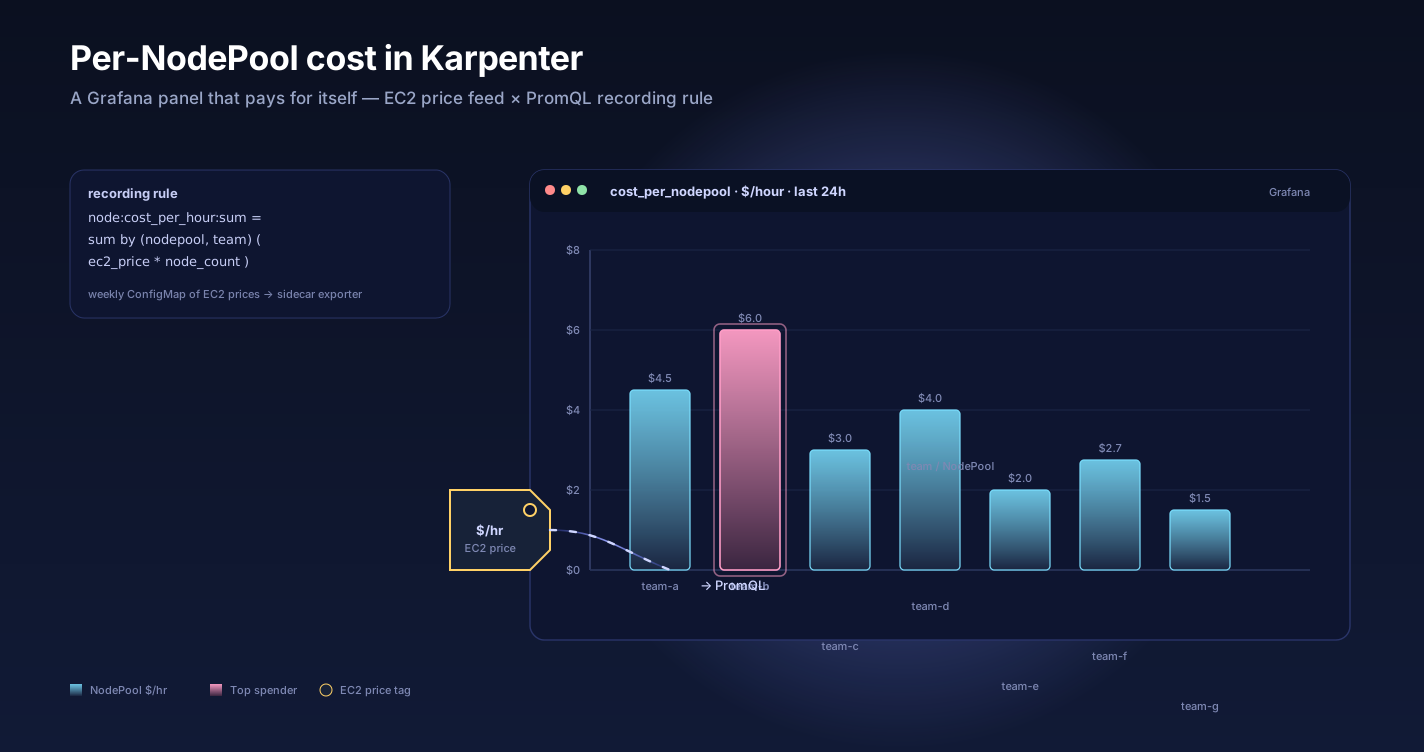
Karpenter ships excellent node metrics but no per-NodePool cost. A Prometheus recording rule plus a Grafana panel cover most FinOps questions without a separate operator.
TL;DR — Karpenter ships great node metrics but no per-NodePool cost. A weekly EC2 price ConfigMap, a 30-line sidecar exporter, and one Prometheus recording rule give you cost-per-NodePool and cost-per-team without running Kubecost. We ship it with every cluster.
The gap
Karpenter ships excellent metrics for what nodes exist:
karpenter_nodes_total_pods{nodepool="default"}
karpenter_nodes_allocatable_cpu_cores
karpenter_nodes_allocatable_memory_bytes
karpenter_pods_state{phase="running"}
What it doesn't ship is what those nodes cost. The instance type is in a label; the price isn't. So FinOps dashboards either:
- Punt to AWS Cost Explorer (1-day lag, account-level granularity, no NodePool dimension)
- Pull a vendor agent (Kubecost, OpenCost) — fine, but another stateful workload to operate
- Or do nothing, and "cost per team" is a Slack thread once a month
We picked option four: a Prometheus recording rule.
The shape
Take the EC2 on-demand price list. Cache it as a ConfigMap. Refresh it weekly with a CronJob. Join it against karpenter_nodes_* in Prometheus. Surface the result as a recording rule.
kuberly:nodepool:hourly_cost{nodepool="default"} = 0.42
kuberly:nodepool:hourly_cost{nodepool="memory-optimized"} = 1.18
kuberly:nodepool:hourly_cost{nodepool="spot-burst"} = 0.09
That's it. Three steps, each independently boring, none of which require running another stateful service.
Step 1 — the price ConfigMap
A small Go program pulls AWS's public pricing API once a week:
curl -s "https://pricing.us-east-1.amazonaws.com/offers/v1.0/aws/AmazonEC2/current/${REGION}/index.json" \
  | jq -c '.products | to_entries[] | select(.value.attributes.tenancy=="Shared")' \
  | go run pricing-flatten.go > prices.json
The output is a flat map: { "m6i.large": 0.0864, "c7g.xlarge": 0.1232, ... }. We kubectl create configmap karpenter-prices --from-file=prices.json it into the karpenter namespace.
A weekly CronJob refreshes this. Pricing changes are infrequent and small; weekly is plenty.
Step 2 — exposing prices to Prometheus
A 30-line sidecar service mounts the ConfigMap, parses it, and exposes:
ec2_instance_hourly_price_usd{instance_type="m6i.large"} 0.0864
ServiceMonitor scrapes it. Now Prometheus has both halves of the equation: which nodes exist (Karpenter) and what each instance type costs (sidecar).
Step 3 — the recording rule
groups:
- name: kuberly.nodepool.cost
  interval: 60s
  rules:
  - record: kuberly:nodepool:hourly_cost
    expr: |
      sum by (nodepool) (
        karpenter_nodes_total_pods
        * on(instance_type) group_left
        ec2_instance_hourly_price_usd
      )
  - record: kuberly:nodepool:hourly_cost_by_team
    expr: |
      sum by (nodepool, team) (
        kube_node_labels{label_team!=""}
        * on(node) group_right
        karpenter_nodes_total_pods
        * on(instance_type) group_left
        ec2_instance_hourly_price_usd
      )
The first rule is total cost per NodePool. The second joins through kube_node_labels to attribute cost by team label, which is what makes this useful for chargeback. Label names (node, instance_type) follow standard kube-state-metrics + Karpenter conventions — if your exporters use different labels, adjust the joins accordingly.
The Grafana panel
Visualization:    Stacked area
Time series:      kuberly:nodepool:hourly_cost
Legend:           {{nodepool}}
Stack:            Yes
Format:           USD per hour
Below it, a table panel:
Query:   topk(10, kuberly:nodepool:hourly_cost_by_team)
Format:  Table
Columns: team, nodepool, $/hour, $/day, $/month
Two panels. ~150 lines of YAML between them. This is the entire FinOps story for most clusters.
What we caught with it
The first time we shipped this to a customer, the dashboard immediately showed a NodePool called burst running 24/7 at $0.40/hour. The intent was that burst would scale to zero when unused. Reality: a CronJob ran every 14 minutes, kept a single pod alive on burst, and prevented Karpenter from consolidating it.
Annual cost of that one misconfiguration: ~$3,500. Time to find it from a Slack thread without this dashboard: probably never.
We've found the same class of issue twice more since. Always the same pattern: a NodePool that nobody thinks is busy but always has one pod on it. For the broader case to switch to Karpenter, see Karpenter is the most underrated EKS upgrade.
Trade-offs to know
- Spot pricing is approximated. We use the instance type's on-demand price, which overstates cost on Spot NodePools. For chargeback that's fine — teams should not get a discount for the SRE team's risk tolerance. For a true finance number, integrate the AWS Spot price API instead.
- The price ConfigMap can drift. A week is fine because EC2 prices change rarely. If you run in regions where AWS rolls new instance types weekly, drop the refresh interval to daily.
- Reserved Instance / Savings Plan discounts aren't reflected. This metric is gross workload cost, not your actual AWS bill. That's the right granularity for "which team is using which NodePool" — not for "what did we pay AWS this month."
Why not Kubecost
Kubecost is excellent. It's also a 4 GB Prometheus consumer, a separate UI, a separate set of CRDs, and another thing to upgrade. For most of our customers, the question is not "what's our exact dollar attribution" but "is anything obviously wasted." A single recording rule and a Grafana panel answer that question with no new operator.
If you need cost-per-pod, ad-hoc cost analysis, ROI modeling, or unit economics — yes, ship Kubecost. If you need a panel on the wall that says "spot-burst is doing $9k/month and you should look at it" — start here.
Ship it
We ship this dashboard with every Kubernetes cluster Kuberly provisions — EKS in production today, GKE and AKS as those runtimes graduate from beta. The recording rule is in our open Prometheus rules pack. The Grafana JSON is in the repo we drop into your Git provider — that's what You own the IaC. You own the infra. is about.
The most useful FinOps tool is the one that's already on every dashboard. This one is.
Further reading
- Karpenter NodePool docs — capacity types and disruption.
- Prometheus recording rules — the rule API.
- AWS Price List API — the data source.
- OpenCost project — the open-source alternative.
- FinOps Foundation — the discipline this serves.
- Karpenter is the most underrated EKS upgrade — why we run it.
- DevOps on autopilot — how this lands on every Kuberly cluster.
Want this panel on your Grafana this week? Talk to us.